Using TED for Your Own Research
The Truth Effect Database (TED) is an open resource built for researchers investigating the illusory truth effect.
We place no restrictions on usage — feel free to explore, analyze, and publish with it.
Please remember:
🔔 All studies used in your final dataset must be cited individually.
A full overview of the available variables is available here:
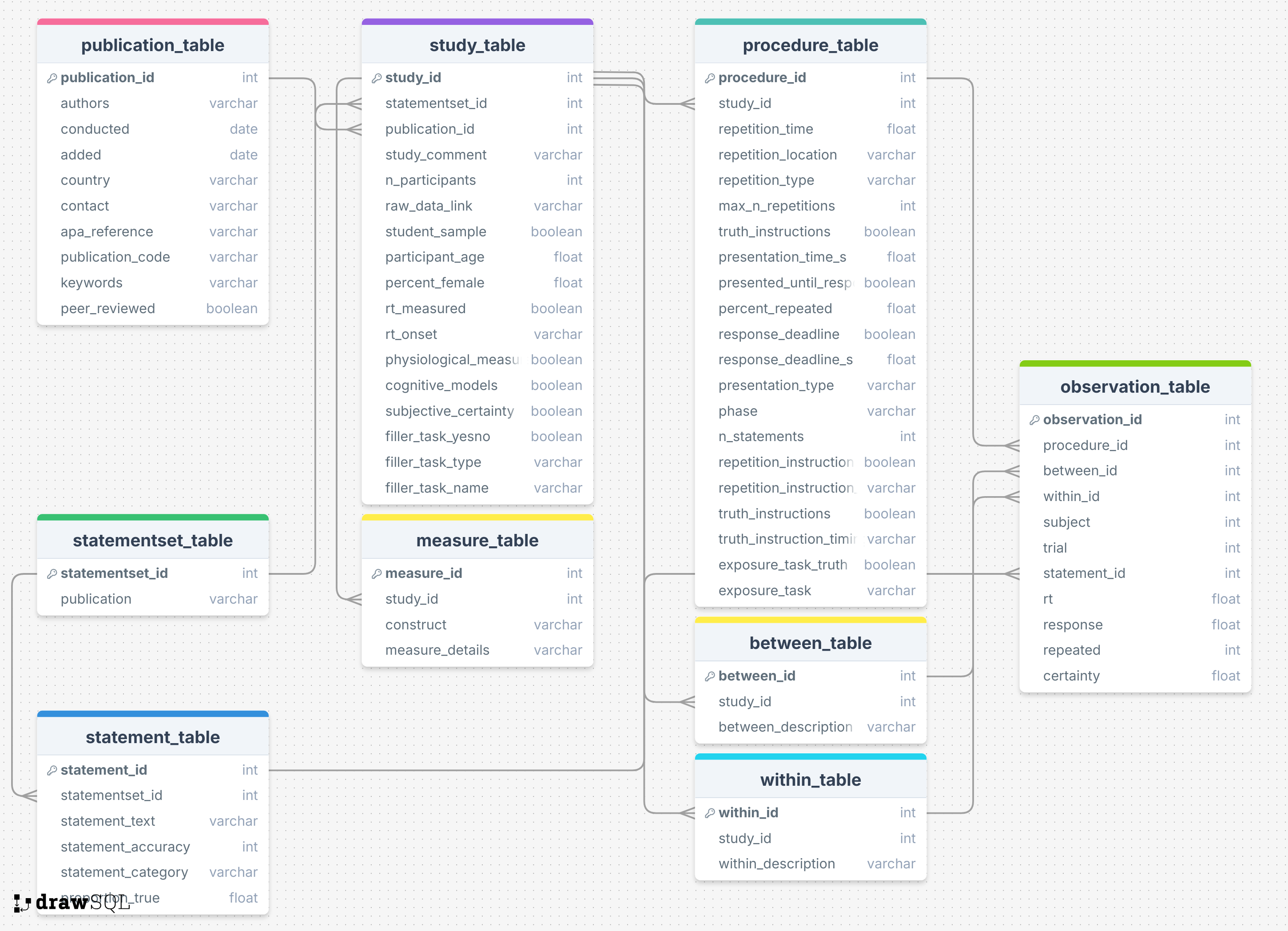
The design of our database is illustrated in the Figure below. Broadly, we make use of a table for each part of data related to truth effect experiments. Meta-data concerning the publications themselves as the highest order are stored in a publication_table and raw data at the lowest level in the observation_table. In addition, we included information on the study, the conditions, the procedure, the statements used, their origin, and additional variables collected in the experiment in respective tables.
This relational approach provides a clear and modular organization of data sources, linking tables through unique identifier variables. We argue that while the use of a relational database adds some complexity, it also introduces an intuitive naming system and structure for variables of interest. Importantly, our goal is that variable names and their table location are the only knowledge that users need to have in order to interact with the database. To this end, we have developed tools that require little to no understanding of the database structure or SQL in order to submit and extract data from the database.
Have questions? Get in touch with us — we’re happy to help.
How to Extract Data
TED is distributed as a single SQLite file. You can use any standard SQL tool or our custom R package for more user-friendly querying.
Download the Database
The latest version of the database is available on GitHub:
Or using the package acdcquery
library(acdcquery)

ted_dir <- "path/to/data"
# Download the latest version:
download_ted(ted_dir)

# OR update an existing version to the newest version
ted_filepath <- "path/to/data/ted.db"
update_ted(ted_filepath)
How to work with TED
Option 1: Use SQL Directly
Open and explore the ted.db file using:
- R (
DBI,RSQLite) - DB Browser for SQLite
- Python (
sqlite3,pandas) - Any SQL client or CLI tool
Option 2: Use Our R Package acdcquery
Use our R package acdcquery to simplify filtering and querying.
🔧 Installation
install.packages("acdcquery") # from CRAN📂 Connect to the Database
library(acdcquery)

# Replace with your local path
conn <- connect_to_db("path/to/ted.db")
🔍 Filter and Query
# Query all entries with a publication ID greater than 0
library(dplyr)

args <- list() %>%
  add_argument(conn, "publication_id", "greater", "0")

full_data <- query_db(
  conn,
  args,
  c("default", "study_id", "publication_id"),
  "observation_table"
)
More documentation and examples:
Summary
- ✅ Use TED data freely — no permission required
- ✅ Query using SQL or the
acdcqueryR package - ✅ Always cite all studies used
- ✅ Contact us with questions or feedback
We’re excited to see what you discover!